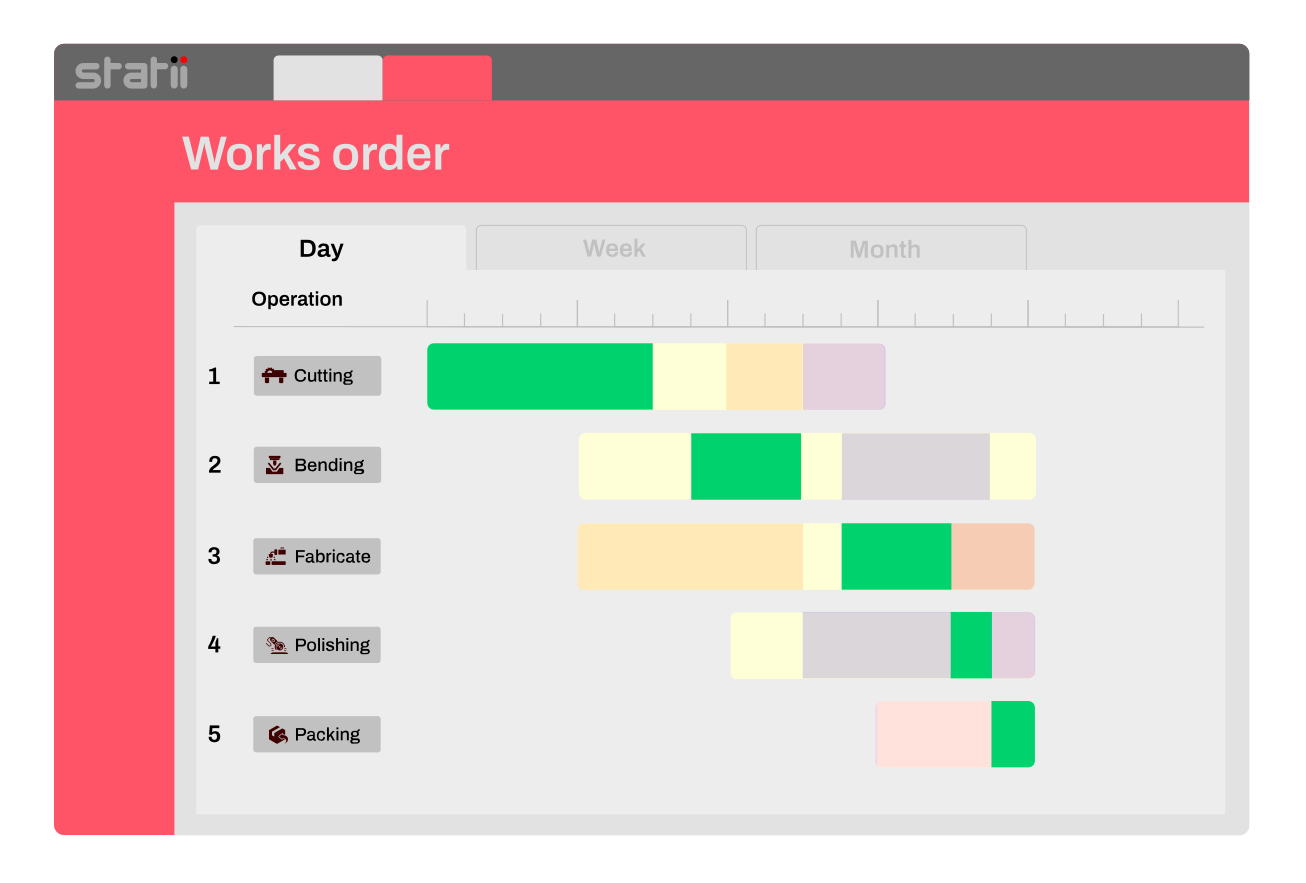
Works order & job card management
The job reaches the shopfloor ready to run.

Every operation in sequence, every material accounted for, every bought-in part tracked — on screen or printed as a job card. Shortages are flagged before anyone picks up a tool.

Everything the job needs, in one place.

Instructions shouldn't live in emails, spreadsheets or someone's head. Three tabs carry the whole job.

Operations in sequence

Each step with its resource, hourly rate and planned time. Add one that was missed and reorder the lot.

Materials from stock

What to withdraw, which rack it's on, and whether there's actually enough of it.

Bought-in items

Purchase orders raised against this job, with supplier and how much has actually landed.

Sub-works orders

Anything made in-house gets its own works order, built out from its bill of materials.

Nothing starts half-ready.

Works orders Warnings
2
Major
shortage
11
Minor
shortage
59
Outstanding
P.O.

You know it's short before it starts

Every live works order is checked against stock. A major warning means nothing has been done about it yet — a minor means someone already has.

WO-004125 Routing
OpOperationEst.Sign
000 Laser cut as per drawingBystronic 4020 1h15m—
001 Fabricate and MIG weldFabricate and Weld 8h—

The floor gets one sheet

Print the job card and every operation, material and purchase order for that job goes out together — with columns to sign off by hand where there's no terminal.

WO-004122-1 Reorder
000 5 axis machineAcuma 40 20 5h24m↑↓
001 DrillCNC machine 6h↑↓
002 Inspect goodsInspection 9h↑↓

It bends when the job does

An operation missed at quoting can be added straight to the works order and moved into position, so the sequence matches how the work is really done.

Production confidence with Works Order management

Every step, with the resource and the rate it runs at.

Operations arrive from the internal costs you entered on the quote. Each carries its resource, hourly cost and planned time — and the works order totals them, so the job has a labour budget before it starts.

  • Planned against actual time, per operation
  • Attach drawings, specifications and instructions to a single step
  • Add an operation that was missed and move it into sequence
WO-004122-1 Time · 3 operations
OpOperationRatePlanned
000 5 axis machineAcuma 40 20 machine 1 £50.005h24m
001 DrillCNC machine £35.006h
002 Inspect goodsInspection £15.009h
WO-004122-1 Stock
ActionItemNeedIn stock
MakeSail 003 10
Take304 SS sheet 10mm 1.50.5
TakeM6 × 25mm screw 25194k
Major — no action taken
Minor — order already raised
Sufficient stock

Every stocked item: short, handled, or fine.

Every item the job needs is checked against what you hold. The colour isn't about how short you are; it's about whether anyone has done something about it.

  • Pink— short, and nothing raised to cover it
  • Blue— short, but a purchase or works order is already in
  • No colour — enough in stock, with the rack it's on
Ready to see a live demo?
Tell us the operations. We’ll print the job card.
Book live demo

What's on order, and what's actually arrived.

Purchase order lines raised against this job sit on the works order itself, with the supplier and the received quantity beside the ordered one. A part-delivery is visible without opening the purchase order.

  • Each line linked back to its purchase order and supplier
  • Ordered against received, so part-deliveries are obvious
  • One purchase order can cover several jobs and still report to each
WO-004122-1 Purchasing
LineOrdRec
100×50×6 SHS per 6m length PO-004595/1 · Aluminium Services Ltd 1212
Steel work PO-004596/2 · ali engineering 60
Job card Works order no. WO-004125 WO 1 of 4
Routing:
OpResource / operationEst.OperatorSign 000Laser cut as per drawing1h15m 001Fabricate and MIG weld8h 002Blast1m
Page 1 of 2

Digital by default.
Printable when it isn’t.

Print the works order and you get the whole job on one card: the part, the routing, the materials and the purchase orders — with empty columns for operator, start, finish and signature. No terminal on the floor, no problem.

  • Printing a sales order produces every job card in the set, numbered
  • Sign-off columns on both the routing and the material lines
  • Carries traceability wording for quality and audit

Parts you make in-house raise their own sub-works orders

Mark an inventory item make rather than take and Statii raises a sub-works order for it, reads its bill of materials, and does the same again for anything inside that.

WO-004122
The job itself
Operations, materials and purchasing for the part you sold.
WO-004122-1 · Sub
A component you make in-house
Raised from a make line on the stock tab. Its own routing, its own materials, its own purchase orders.
WO-004122-1-1 · Sub-sub
And a component of that
The multi-level bill of materials keeps going until everything the build needs has been accounted for.
One make line · the whole build accounted for

Month-to-month

No long-term contract. Cancel at a month’s notice.

No support fees

Unlimited phone and screen-sharing support from a person.

Free upgrades

New features and system upgrades at no extra cost.

Calculate your exact price instantly
Tell the calculator how many main users and shop floor users you need. You get the real monthly figure — no call, no “contact us for pricing”.
Pricing calculator

Planned here.
Scheduled and recorded next.

Scheduling

Each step with its resource, hourly rate and planned time. Add one that was missed and reorder the lot.

Shop floor data collection

Each step with its resource, hourly rate and planned time. Add one that was missed and reorder the lot.

Raised by the order. Reports back to it.

Works orders are created when the sales order is acknowledged, and everything booked against them flows back to the job's costing.

Answers to common questions

When does a works order get created?

When the sales order is sent to the customer and its status becomes acknowledged. Converting a quote creates the sales order; acknowledging it creates the production paperwork underneath.

What if we missed an operation when we quoted?

Add it to the works order and move it into position with the reorder arrows. Works orders can be changed whenever the job changes — the sequence should match how the work is actually carried out, not how it was guessed.

Do we need terminals on the shop floor?

No. Print the job card and the operator fills in start, finish and signature by hand, then those times go back into the works order. Or close it with a completion date and no time at all. With shop floor data collection the same thing happens on a screen instead.

What happens when a part has parts of its own?

Mark the inventory item make and Statii raises a sub-works order against its bill of materials — and again for anything inside that. The numbering carries the structure, so WO-004122-1-1 is a component of a component.

Does Statii handle purchase orders and inventory as well as works orders?

Yes. Purchase orders raised for a job appear on the works order’s purchasing tab with their supplier and received quantity, and stock is checked and withdrawn against the same works order. Both are modules in their own right, and both report back to the job’s costing.

Does the works order schedule the work?

No. The works order defines the operations and the order they run in. Scheduling assigns them to workstations and decides when — including operations that run in parallel, in sequence, or against a timed dependency.

Set up for how your workshop actually runs

Manufacturing is a broad word. Statii is configured for the way your sector works.

See how a costed job runs when it's live

Three minutes, no sales call. Or ring us on 0115 647 2022 and ask anything.

No card required · UK-based support included

Keep Every Job on Track with Works Order Management

Centralise instructions, link operations to real resources, and schedule with confidence with the Works Orders module to ensure each job progresses efficiently from start to finish.

Key Benefits

Production confidence with smart Works Order management

Multi-Step Job Setup

Plan Complex Jobs with Clarity and Speed

Custom builds often mean custom workflows. Statii lets you break jobs into clear, manageable steps.Assigning operations, linking specs, and keeping every detail in one place. No confusion. No missed tasks.

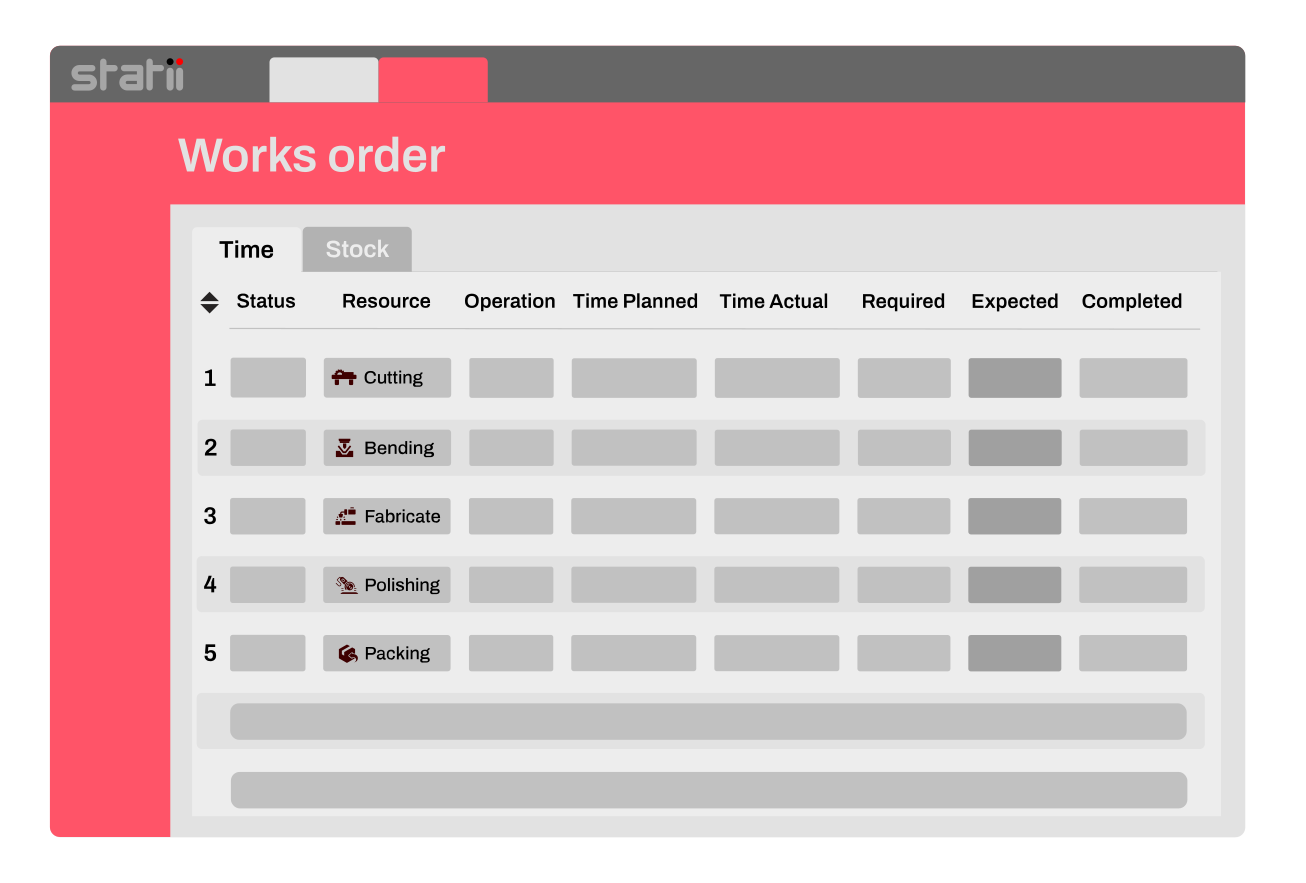
Works order operations ordering.
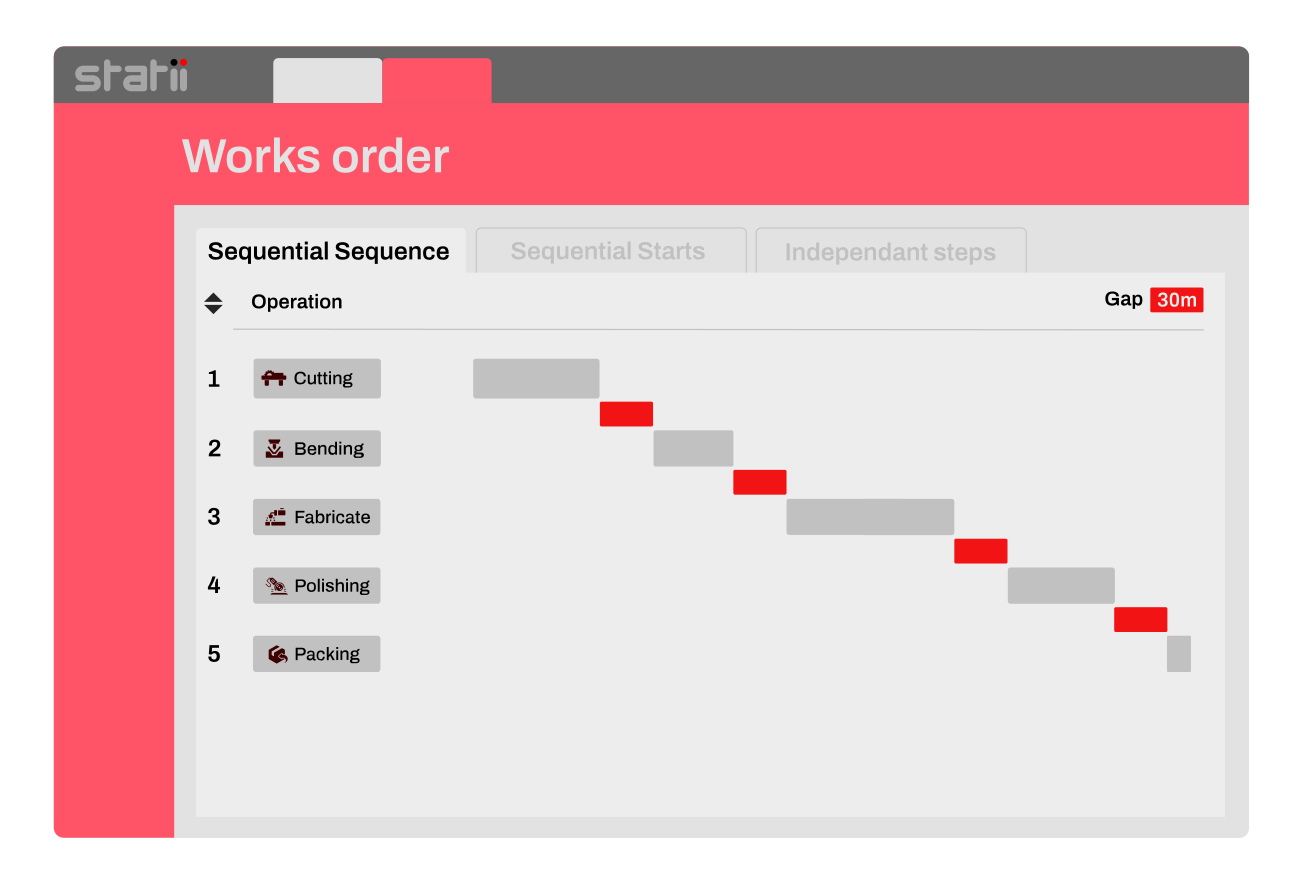
Works order operations scheduling sequence.
Smart Sequencing & Dependencies

Automatically Build in the Right Order

Whether you need parallel operations, step-by-step flow, or timed gaps between tasks, Statii keeps your job logic intact. Sequencing ensures operations follow a clear path. No clashes or skipped steps.

Live Shop Floor Data Capture

Track Progress as It Happens

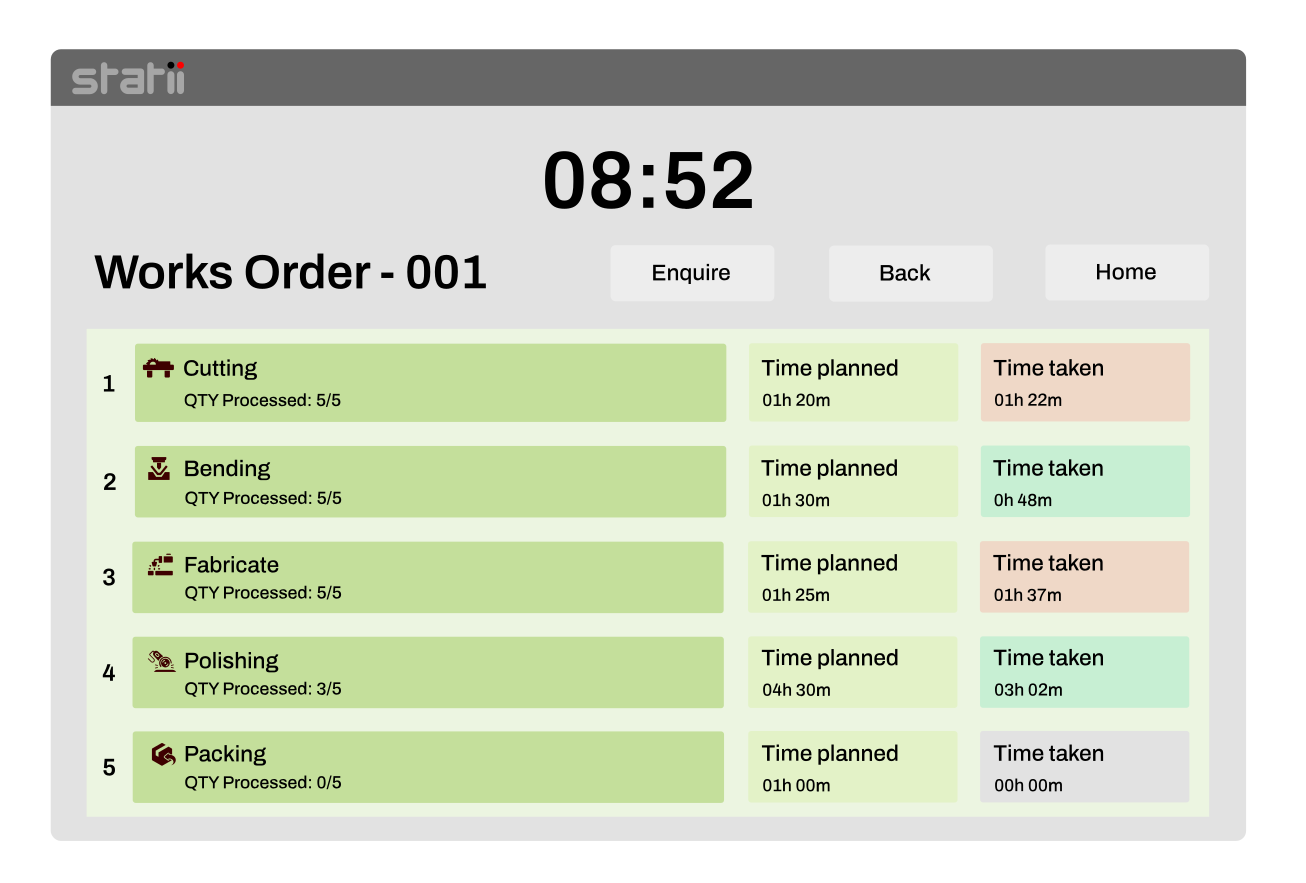
Give your operators the tools to update job status, log time, and flag issues straight from the floor. Real-time updates keep managers informed and jobs moving without chasing.

manufacturing shop floor data collection Works Order screen with operations planned and actual time.
Works order scheduling visual planner GANTT view.
Visual GANTT-Style Planner

Stay Agile with Drag-and-Drop Scheduling

See your entire production schedule at a glance. Easily reschedule jobs, balance workloads, and respond to change with a visual planner that links directly to each works order.

Key features

Auto-Scheduling and assignment

Hover for tooltip

Give your operators the tools to update job status, log time, and flag issues straight from the floor. Real-time updates keep managers informed and jobs moving without chasing.

Live Shop Floor Updates

Hover for tooltip

Give your operators the tools to update job status, log time, and flag issues straight from the floor. Real-time updates keep managers informed and jobs moving without chasing.

Multi-Step Job Setup

Hover for tooltip

Give your operators the tools to update job status, log time, and flag issues straight from the floor. Real-time updates keep managers informed and jobs moving without chasing.

Smart Job Sequencing

Hover for tooltip

Give your operators the tools to update job status, log time, and flag issues straight from the floor. Real-time updates keep managers informed and jobs moving without chasing.

Integrated Inventory Control

Hover for tooltip

Give your operators the tools to update job status, log time, and flag issues straight from the floor. Real-time updates keep managers informed and jobs moving without chasing.

Visual Planning Board

Hover for tooltip

Give your operators the tools to update job status, log time, and flag issues straight from the floor. Real-time updates keep managers informed and jobs moving without chasing.

Digital & Printable Route Cards

Hover for tooltip

Give your operators the tools to update job status, log time, and flag issues straight from the floor. Real-time updates keep managers informed and jobs moving without chasing.

Click-to-View Job Detail

Hover for tooltip

Give your operators the tools to update job status, log time, and flag issues straight from the floor. Real-time updates keep managers informed and jobs moving without chasing.

Job Costing Integration

Hover for tooltip

Give your operators the tools to update job status, log time, and flag issues straight from the floor. Real-time updates keep managers informed and jobs moving without chasing.

Works Order Grouping

Hover for tooltip

Give your operators the tools to update job status, log time, and flag issues straight from the floor. Real-time updates keep managers informed and jobs moving without chasing.

Use Cases

Why Works Order Software Matters for SMEs

Reduced Production Errors and Rework

Clear instructions and sequenced operations ensure that complex custom jobs are built exactly to spec.

Improved On-Time Fulfiment & Delivery Rates

Live status tracking and scheduling based on actual resource availability prevent bottlenecks and missed deadlines.

Real-Time Cost and Progress Visibility

Monitor job profitability in real-time. Time and materials booked to each works order update costing instantly.

What other manufacturers say about us

"

I can confidently say it has been a game-changer for us. It has allowed us to effectively track our day-to-day operations and achieve full traceability for our orders, which was instrumental in helping us secure ISO 9001 certification earlier this year.

Tom
"

Everything we did on spreadsheets now linked in one screen. Easy to use linked process with visible information at all times, Statii has made a positive impact on all area's of the business.

Ian
"

This software has made our company more profitable, more efficient, easier to run and organise, we can track and understand what our operative are doing, our accounts has had a custom file made by Statii to work with sage. Every step of the way has been a fantastic experience.

Daniel
"

We've found the Statii system to very adaptable to our requirements & it has massively improved our business controls from the multiple excel spreadsheets & manual methods that we used previously. I would definitely recommend Statii to any business that is looking to implement an MRP system.

Nicola
"

Simple software that allows us to manage all orders, stock, suppliers and orders in one place. It easily manages shop floor jobs, goods in and pulls everything together.

Ashley
"

The biggest thing for me is the time that Statii now saves us, which means we can give enough time to focus on real issues that will allow us to grow our business to a level we have aspired towards for far too long, but literally never had the time. Having Statii means also I can see from any PC whats going on in the business, at anytime, again something not possible before.

Mark
"

Statii is very easy to use... We export the sales and purchasing information into Sage and this a is seamless task.

Claire
"

I found it easy to use, eliminating repetitive entries which was very time consuming using our old spreadsheets etc; Everything is linked and to hand like having a folder in a filing cabinet and all the documents slotted in ready to view.

Julie
"

A very easy to use but powerful tool. Superb for our needs as an Engineering Company with both Fabrication & Machining. Excellent training & support with any queries resolved quickly.

Andy
"

The software easy to use, learn and navigate as well as keep track of projects from start to finish from initial enquiry to delivery and installation.

Farhan H.
Ready to transform your manufacturing process?